

 All products
Filter by display-type


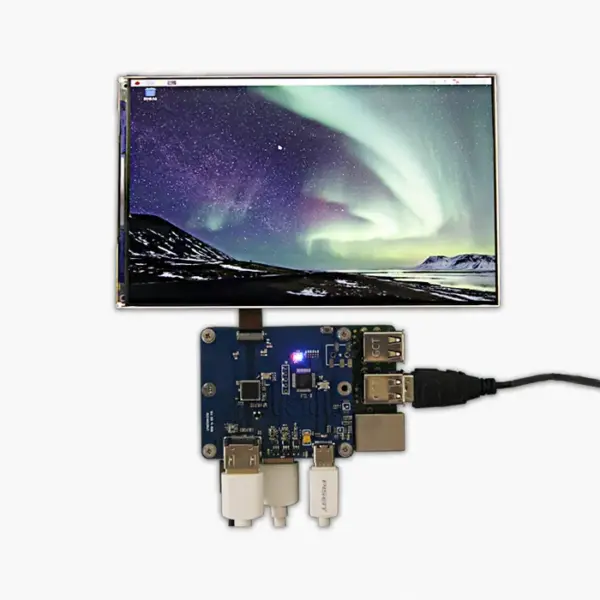
7 Inch 1200 x 1920 TFT Tablet LCD Screen Raspberry Pi
| Size |
7 inch |
|---|---|
| Pixels |
1200 (H) × 1920 (V) (WUXGA) |
| Interface | |
| Brightness |
450 cd/m² |
| Manufacturer |
Gesight |
| Display Type |
IPS LCD ,TFT-LCD |
| Display Mode |
Normally Black |
| Color Depth | |
| Refresh Rate |
60Hz |
| Viewing Angle Range |
80/80/80/80 (Typ.)(CR≥10) |
| Outline L*W*H |
97.3 mm (W) × 159.4 mm (H) |
| Active Area L*W |
94.5 mm (W) × 151.2 mm (H) |
| Orientation | |
| Build-in Touch IC |
Not included |
| Supply Voltage |
1.8/3.0/3.0V (Typ.)(IOVCC/VDD/VDDP) |
| Operating Temperarure |
-10°C ~60°C |
| Storage Temperature |
-30°C ~70°C |
| Aspect Ratio |
5:8 (H:V) |
| Connection Type |
Hirose DF19LA-20P-1H (signal), JST BHR-04VS-1 (backlight) |
| IC package |
COG Built-in ISL97692IRTZ |
| Touch Panel | |
| Sunlight Readable |
Yes |
| Model |
LT070ME05000 |
| PPI ( pixels per inch ) |
323 PPI |
Gesight Technology offers high-quality Raspberry Pi LCD displays at wholesale prices directly from the factory. These displays are designed for Raspberry Pi projects, featuring customizable options and reliable performance. With expert engineering support, they are perfect for enhancing your Raspberry Pi projects.
Raspberry Pi LCD
What Are the Different Types of Raspberry Pi LCD Displays?
Raspberry Pi LCD displays include TFT, IPS, and OLED panels, available in sizes from 3.5-inch to 7-inch. They can be resistive or capacitive touchscreens and support various interfaces such as HDMI, SPI, and MIPI, allowing use in embedded projects, industrial applications, gaming, and educational setups.
How Does a Raspberry Pi Touchscreen LCD Work?
A Raspberry Pi touchscreen LCD works by detecting touch inputs through capacitive or resistive sensors. The display communicates with the Pi via HDMI, SPI, or MIPI interfaces, while software drivers interpret touch gestures, enabling interactive control for applications, HMI systems, or gaming projects.
What Is the Ideal Raspberry Pi LCD Screen Resolution?
The ideal Raspberry Pi LCD resolution depends on the project. Common resolutions include 480×320 for small projects, 800×480 for standard displays, and 1024×600 or higher for tablets and gaming. Higher resolutions provide sharper images and better touch experience but may require more processing power.
How Do You Set Up a Raspberry Pi LCD Display?
Setting up a Raspberry Pi LCD involves connecting the display via HDMI, MIPI, or SPI, attaching power, and installing drivers. Configuration can be done through Raspberry Pi OS settings or terminal commands to adjust resolution, rotation, and touch calibration, ensuring proper functionality.
How to Install a Raspberry Pi LCD Display Easily?
For easy installation, connect the display to the Pi via the recommended interface, secure it with screws or mounting brackets, and install the driver software. Pre-configured OS images or plug-and-play modules can simplify setup for beginners, minimizing configuration and calibration steps.
Which Protective Cases Work Best for Raspberry Pi LCDs?
Protective cases designed for Raspberry Pi LCDs offer precise cutouts for ports and screens, often including standoffs, ventilation, and durable plastics or acrylic. Cases with integrated mounts for touch displays provide stability, prevent damage, and allow easy access to GPIO pins and connectors.
Where Can You Buy a Raspberry Pi LCD Ribbon Cable?
Raspberry Pi LCD ribbon cables can be purchased from electronics retailers, online marketplaces like Amazon, AliExpress, and official Raspberry Pi distributors. Ensure compatibility with the display’s interface type and connector size for proper installation and reliable signal transmission.
How Can You Use Raspberry Pi LCDs for Gaming Projects?
Raspberry Pi LCDs enable portable gaming setups by connecting to retro emulators, custom game consoles, or Raspberry Pi-powered handheld devices. High-resolution and touch-enabled displays allow immersive experiences, interactive controls, and compact designs suitable for both casual and advanced gaming projects.
How Can Raspberry Pi LCDs Improve Home Automation?
Raspberry Pi LCDs act as control panels for home automation systems, displaying sensor data, security camera feeds, or smart device controls. Touchscreens allow easy interaction with lights, thermostats, or alarms, providing a compact, customizable interface for smart home monitoring and management.
What to Do When Your Raspberry Pi LCD Is Not Working?
If a Raspberry Pi LCD is not working, check connections, ensure correct power supply, and verify driver installation. Adjust display settings in Raspberry Pi OS, update firmware, and test with another interface or cable. Inspect for hardware damage or loose connectors, and consult the display manufacturer or supplier if problems persist.